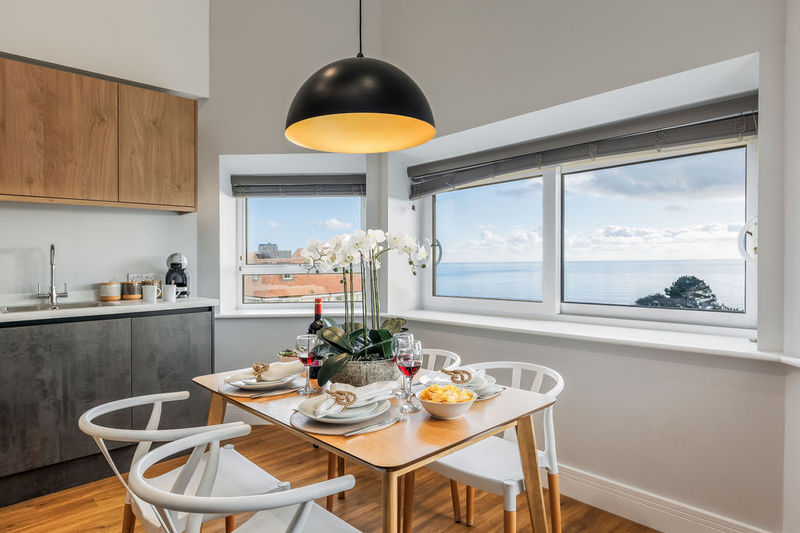
Short term accommodation with fast wifi for temporary stays
Choose short term accommodation with fast wifi by checking speeds, room coverage and rental terms. See what 12 to 60MB per second means before you book.


On this page
How fast is the internet in temporary accommodation? Speeds can range between 12MB per second and 60MB per second, depending on location. For short-term accommodation with fast Wi-Fi, that’s a useful starting point, but the connection’s coverage and how it performs across the property matter too.
A reliable connection can make a temporary stay feel settled, whether you’re working remotely, joining video calls or streaming in the evening. It’s also worth checking that Wi-Fi is included, so you know what to expect before you arrive.
This guide explains what those speeds mean in practice, how to assess coverage and confirm what’s included with a rental, and what to understand about hire periods and extensions. It’s for anyone arranging a short stay, a longer temporary move or accommodation while plans are still taking shape. You’ll have a clearer picture of what to look for before you book and how to choose a stay that fits your internet needs.
Key takeaways
- Use the stated speed range of 12MB per second to 60MB per second as a starting point, then consider what you’ll use the connection for.
- Coverage can vary from room to room. Ofcom’s checker gives predicted mobile coverage, but indoor reception can differ.
- Check the rental terms to establish whether Wi-Fi is included and what details are provided about the connection.
- For stays lasting several weeks or months, consider how a temporary internet arrangement can fit the length of your stay and any extension.
- Compare accommodation types by the Wi-Fi information they provide, rather than assuming a particular type guarantees a fast connection.
Advertised internet speeds
Temporary internet speeds range from 12MB per second to 60MB per second, depending on location. Treat the advertised speed as a guide, then consider how many people and devices will share it.
Internet options across accommodation types
Serviced apartments, aparthotels, hotels and holiday lets may provide Wi-Fi. The property type alone doesn’t indicate speed or room coverage, so compare details for the individual rental. For instance, an apartment with parking and Wi-Fi is a specific example to weigh against your needs.
Speed needs for calls and remote work
Video calls, file transfers and streaming may happen at the same time, especially when several guests share a connection. Compare the connection details with your routine, including simultaneous calls and uploads.
What Wi-Fi speed is suitable for video calls and remote work in short-term accommodation? It depends on call quality, file transfers and the number of connected users. Consider your typical workday rather than choosing by a “fast Wi-Fi” label alone.
What is the average nightly and weekly price for UK accommodation with fast Wi-Fi? Rates vary by property, location, dates and stay length. Compare similar rentals for the same dates and duration.
Which UK cities have the most short-term rentals with high-speed internet? There isn’t a dependable city ranking. Internet arrangements vary between individual properties, so compare their stated connection details rather than relying on the city or property category.
Guest reviews can offer practical context. Look for specific mentions of work calls or streaming rather than relying on a general comment about Wi-Fi.
Business travellers may need calls and file access, while leisure guests may mainly browse or stream. Consider the tasks and connected devices you’ll use when assessing an advertised connection.
Device capacity is another detail to weigh when several guests bring phones, computers and other connected equipment. Some 4G and 5G home broadband routers support up to 64 simultaneous device connections. That figure describes how many devices may connect, so consider it alongside the advertised speed and the number of people who will use the service. Flexiestays Bournemouth advises guests to check the Wi-Fi details for each property when booking serviced accommodation. Checking the individual listing can help clarify what connection is offered before you rely on it for work or other online tasks.
For a short stay, a phone hotspot may be sufficient for one person using the internet lightly for a few days in temporary accommodation. For a longer stay or heavier use, no-contract fibre broadband plans in the UK can offer speeds from around 30Mbps to 1Gbps or higher, depending on available infrastructure. Device choice may also depend on how you plan to use the connection: Worldpay found that 90% of flights were booked on desktops in its study of travellers. If your own tasks require a computer as well as a phone, check that the connection option you choose suits those devices and your expected use.
Wi-Fi coverage throughout a property
A connection may work well near the router but less reliably in other rooms. Consider where you’ll use a laptop, join calls or stream during your stay. Mobile reception and Wi-Fi coverage are different: a strong outdoor network signal doesn’t guarantee strong indoor Wi-Fi.
Ofcom’s mobile coverage checker provides predicted 4G and 5G coverage for a rental address. It offers an indication of UK network coverage, but indoor reception can differ because of building materials and other conditions. An address prediction won’t show exactly how well a signal works in each room.
For indoor mobile coverage, consider how the connection performs where you’ll use it. A mobile broadband router needs a suitable signal inside the building, and its position and the layout can affect reception. Signal beside a window, for example, may differ from reception behind thicker walls.
Keep these coverage details distinct when comparing properties:
- Mobile network coverage: the checker predicts 4G and 5G coverage for an address, while indoor reception can differ.
- Wi-Fi coverage: the router distributes its connection around the property, with walls and layout affecting the signal between rooms.
- Intended use: consider where you’ll work or stream, not only the room nearest the router.
A hired router’s advertised Wi-Fi distance is around 100 meters. Treat that as a stated range, not a promise of consistent service throughout the property. Walls, layout and signal conditions affect coverage. In an apartment with a separate bedroom, for instance, the signal may feel different there than in an open-plan living area.
Property-specific information can help you understand Wi-Fi access and which rooms it reaches. Reviews mentioning particular rooms add context, but reflect individual experiences rather than a measured coverage map. If you work on a laptop, consider whether the connection reaches your workspace as well as the main living area.
Before relying on mobile broadband as a fallback, consider the equipment and data allowance as well as where it can be used. A forum contributor recommended mobile broadband as an alternative to tethering, noting that the devices can be wireless boxes rather than dongles that plug into a computer. A forum contributor suggested that mobile broadband for Netflix and similar use would need around 10GB or more of data. Treat that as a contributor’s suggestion when checking whether an allowance fits your own viewing.
The mobile Wi-Fi devices being considered for the rental were described as having a battery life of 6 hours. A forum contributor said mobile Wi-Fi devices generally use a standard mobile-phone-type USB charger and can be run from the mains. That may be relevant when deciding where a device can be placed in relation to the rooms you use. Compare contract and pay-as-you-go options for your circumstances rather than assuming one will always be cheaper. Worldpay's study covered 10 markets globally, a separate figure that does not describe coverage inside a particular rental.
How accommodation providers confirm Wi-Fi is included with a rental
Wi-Fi may be included as an amenity, but a listing should explain what access involves. For a six-month rental, details such as data limits and how the connection is provided are especially relevant.
How accommodation providers verify Wi-Fi speed before booking
To check speed before booking, ask for a connection test from the property. Find out whether it measures the accommodation’s broadband and reports both download and upload speeds. A property-specific result is more useful than a general estimate, as it relates to the connection available at that address.
Check how the listing describes internet access. “Wi-Fi included” confirms that wireless access is part of the stay, but doesn’t explain speed, data allowance or whether the connection is shared. Look for a description that clarifies how guests connect, such as access to the property’s broadband rather than reliance on a personal mobile data plan.
For a remote-working stay, match the connection information to your routine. Someone joining video calls and uploading work files needs different information from a guest using a device for email and occasional streaming. Ask for the measured speed, where the test was taken and whether it relates to the rental itself. This helps you interpret the result without assuming the advertised speed will be identical throughout the day.
What to expect from providers on Wi-Fi reliability, data limits and wired connections
Ask whether internet access is included in the rental, whether it has a data limit and whether a wired connection is available. These details help distinguish fixed broadband from mobile tethering, which depends on your phone contract, data allowance and signal strength. Some UK mobile networks also set fair-use limits on tethered devices.
Discuss reliability in practical terms. Explain whether you need a laptop for regular calls, several devices connected at once or streaming after work. The accommodation details can then help you understand the connection arrangement and any relevant limits. Avoid relying on an adjective such as “fast” when your decision depends on specific tasks.
For a longer booking, review the internet details alongside the other rental terms before agreeing. A six-month stay raises practical questions that a short visit may not: whether the included service stays the same, how access is described in the agreement and what happens if your usage changes. Written terms make it easier to understand what’s included and plan around your devices.
Keep the key details together: tested speed, whether Wi-Fi is included, any data allowance and whether wired access is available. This gives you a useful basis for comparing rentals without assuming every broadband connection works in the same way.
Hire durations and extensions
A mobile home router may suit temporary accommodation lasting several weeks or months. The right arrangement depends on your stay length, data use and whether internet is already included. A short visit may need a simple connection for essential tasks, while a longer stay calls for clarity about ongoing access and what happens if your plans change.
Before arranging temporary internet, match the hire period to your accommodation dates. For a six-month rental, a short initial hire could leave you without the same connection later. Check the start and end dates, whether the device must be returned and how changes to your booking affect the hire. Keep the router’s terms separate from the accommodation agreement, as they may cover different dates and conditions.
Extensions are easier to manage before the original hire period ends. Tell the provider the revised end date and ask for the extension terms in writing. Check whether the same device and data arrangement continue, and whether the return instructions change. If your departure date is uncertain, find out how to arrange an extension and when the revised period takes effect. Don’t assume it happens automatically.
- Short stay: compare the router hire period with your check-in and departure dates.
- Several weeks or months: confirm how ongoing access works and when the device must be returned.
- Possible extension: arrange revised dates before the current hire ends, then keep the updated terms.
- Data use: check the allowance and any usage conditions rather than assuming access is unlimited.
What are the cancellation and minimum-stay rules for UK short-term accommodation? Minimum stays and cancellation conditions appear in the booking terms and vary by property and booking arrangement. Read the cancellation deadline, any charges and the minimum booking period before confirming. If you’re hiring a separate router, check its cancellation conditions too.
If your stay may run longer than planned, keep the accommodation and internet hire end dates together. For example, an extended work placement may require separate changes to the room booking and router arrangement. Confirm both revised periods in writing, including any device return steps. This avoids relying on an assumed extension or unlimited data when the original terms set a different end date or allowance.
What types of short-term accommodation in the UK offer fast Wi-Fi?
Fast Wi-Fi may be available in serviced apartments, aparthotels, hotels and holiday lets. The property type alone doesn’t show whether the connection suits your plans. Compare each rental’s internet details and consider whether its layout fits your stay.
Serviced apartments provide private living space and may suit guests who want room to work as well as relax. A separate bedroom, for example, can offer a quieter place for calls away from the living area. Consider how the rooms support your routine, particularly if someone else will use the space during the day.
Aparthotels and hotels offer private guest accommodation, but Wi-Fi arrangements vary. Check whether internet access is available in guest rooms or only shared areas. Someone working at a desk in their room has different needs from a leisure guest who mainly uses a phone in a lounge.
Holiday lets and short-term rentals range from flats to larger homes, with varied layouts and internet arrangements. Read the property description and terms together. In a shared house, for example, guests may be working, calling and streaming at the same time, so combined household use matters.
- For remote work: consider whether the room layout supports a focused workday.
- For shared stays: account for guests’ overlapping work and leisure routines.
- For streaming: read the property’s internet terms alongside its amenity description.
- For longer bookings: consider whether the stated internet arrangement suits the whole stay.
Properties in the same category can use different internet setups. One may have fixed broadband, while another relies on mobile broadband. Assess each rental individually rather than assuming that a hotel, apartment or holiday-let label guarantees a particular connection.
For your next stay, weigh the accommodation type against how you plan to use the space. A quiet work area, room layout and internet arrangement all affect how comfortably the property fits your routine.
Flexiestays Bournemouth
Flexiestays Bournemouth offers short-term stays at Tower House Apartments Hotel, Cliff Heights Apartments Hotel, Cliff Manor Apartments Hotel and Shore Retreat Apartments Hotel. The apartments also have self-check-in and smart TVs, making them a practical option for guests balancing remote work, calls and downtime.
Before choosing, consider how you’ll use the internet connection, which rooms matter for work or streaming, and how long you plan to stay. These details help you focus on the practical fit, not just the phrase “fast Wi-Fi”. For short term accommodation with fast wifi that fits your plans, consider these details when deciding where to stay.
Make your next stay work around you
Before settling on short-term accommodation with fast Wi-Fi, think about what a good day in the property needs to look like. Perhaps you’ll start with work calls, spend the afternoon exploring Bournemouth, then return to stream a programme. Your ideal stay should make those routines feel straightforward, not leave you adjusting plans around an uncertain connection.
Choose the details that matter most, whether that’s a comfortable place to work, internet access for several devices or a stay that can adapt to changing plans. Use those priorities to guide your accommodation choice. A little clarity now can make settling into a temporary home much easier.
If Bournemouth is the right place for your stay, get in touch about a stay and take the next step at your own pace.
Frequently asked questions
Temporary internet speeds can range from 12MB per second to 60MB per second, depending on location. The figure alone won’t tell you how well a connection handles your routine. For example, video calls, file uploads and streaming at the same time place different demands on a connection than checking email. Match the advertised speed to the tasks you’ll need to do during your stay.
If the internet isn’t working as expected, describe the problem clearly, such as dropped video calls or slow downloads, and when it happens. For urgent access, a phone hotspot may be a temporary alternative, subject to your mobile signal, data allowance and contract terms. If you’re booking, read the accommodation terms to understand how included internet access is described.
There’s no useful like-for-like ranking: accommodation listings may describe speed differently, and advertised figures depend on location. Compare property-specific speed information rather than relying on labels such as “fast Wi-Fi”. For work calls, look for separate upload and download results, since sending and receiving files use different parts of the connection. Reviews can add context about guests’ experiences.
A phone hotspot can share a mobile connection with your laptop or another device, provided your mobile signal and data allowance suit your use. For longer stays, mobile broadband offers another option through a wireless router. Check how your mobile contract treats tethering and data use. Ofcom’s coverage checker provides predicted 4G and 5G coverage for an address, though indoor reception can differ.